Plagiarism Detection: How to Win Against Thieves Who Steal Your Articles!
Plagiarists love your original content published at EzineArticles and other honest publishers because it ranks high in Google's search results. The trouble is that plagiarists do not include a link back to your site or author credit—because they do not publish the resource box or include a link back to the article source. Here are 5 steps you can take to protect your content, detect plagiarism, and get unauthorized copies of your content removed from the World Wide Web:
Include copyright and author information when creating your articles,
Set up an early detection system for finding plagiarists,
Identify and contact the offenders,
Identify and contact their registrars or hosts, and
Submit a Digital Millennium Copyright Act (DMCA) complaint.
1. Include Copyright and Author Information with Your Articles
The first step in the war on plagiarism is to provide copyright information in the article body as well as author information in the resource box. Within the article body, you can include a copyright notice and the article title with it's date of publication. Here is an example of what I use at the end of my articles:
Depending on the publisher's article-submission requirements, you may not be able to use an active link or domain name in the article body, as I did above. Even if these are permitted, all active links and URLs in the article could be stripped by the plagiarist, although a non-hyper linked reference to your site might still remain—especially if the plagiarist is using software to automate the theft.
You can use the resource box to positively identify yourself as the author and can include a link to your web site or blog. Here is an example:
About the Author: Royce Tivel has written extensively about digital photography, Adobe, radio-controlled (RC) airplanes, WordPress, travel, and more. Visit his web site at Select Digitals, selectdigitals.com, for additional content on these subjects, including many images related to his articles published at [publisher's name goes here].
The HTML code for the link looks like this—and I would strongly recommend using a hyperlink to your site in the resource box:
<a href="http://www.selectdigitals.com" target="_blank" title="Content by Royce Tivel at SelectDigitals.com">Select Digitals</a>
An honest publisher will include the resource box, will not tamper with the article body, and will provide a link to the article source. If a plagiarist strips out the resource box or neglects to include a link to the article source, the chances are still good that the copyright and author information will be left in the article body.
2. Detect the Plagiarism Early
Plagiarism detection begins by setting up an early warning system for plagiarists. I estimate that 90% of all article theft is done when the article is first published. The worst offenders appear to be plagiarists with blogs. Today, content can be easily gathered with content-aggregator software through RSS (Really Simple Syndication) feeds, manipulated, and placed on a blog.
"White hat" content aggregation that includes author credit and article source information is great for authors--but "black hat" manipulation of the aggregated content, which removes the author and source information is just plain article theft.
Many WordPress sites are using the Multi User (MU) version and offer "members" a free WordPress blog as a sub-domain. An offshoot of WordPress is BuddyPress—and I have found plagiarized content at these sites, too. I have found that there is little or no supervision or monitoring of the "members." I have also found that the administrators of the MU sites will terminate a blog when they receive a report of plagiarism. In the case of a sub domain on an MU site that has plagiarized your material, the registrant in a lookup will be the "owner" of the domain who is responsible for the sub-domains. Your plagiarism detection system must first identify the plagiarist before you can report them to the administrators.
Because of the blog problem, a Google Blog Search on the title of the article, a keyword, a phrase, or a "snippet" from the first paragraph of the article—using quote marks around the search term(s)—is probably your best *no cost* tool for plagiarism detection (Figure 1). Jonathan Bailey at plagiarismtoday.com has this advice for searches:
"I would focus not on titles but statistically
improbable phrases within the work, 8-10 words long. Those produce
good matches and are easy to find in a work."
Figure 1: Google Blog Search
Once the search is completed (Figure 2), and if there are results matching your quoted search query, you will be able to look through the results for plagiarized content. Since the first result shown below came neither from my site nor from my article publisher, I would certainly want to check it out.
Figure 2: Blog Search Results
Google's search results include a title (blue), a snippet (black text), and a URL (green). The URL will include the domain name of an offending site. Clicking on either the title or URL will take the browser to the actual blog or web page. The domain name will also appear as part of the URL in the browsers address bar.
Even if the snippet contains plagiarized text from your article, the title or URL may take you to pages with no trace of your article. This can happen when your plagiarized article is published by the plagiarist, gets listed in Google, and then the plagiarist substitutes his own page content for your article: the plagiarized content remains in the snippet but the links go to the plagiarist's own content, thus hijacking your traffic! The remaining "footprint" left in the snippet can be enough to shut down a site or blog.
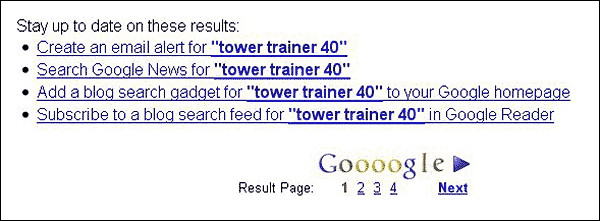
A great feature of the Google Blog Search comes at the bottom of the results page. At the end of the results are options for setting up email alerts—the early warning system—so you can be notified when sites use the search term in the future (figure 3).
Figure 3: Alert Options
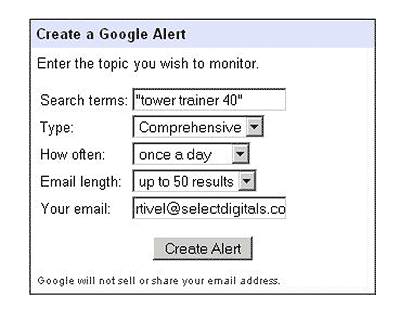
You are most likely to see plagiarized results show up within the first few days of publication; so, I recommend that you set up your alert to receive an email once each day. You can end the alerts at any time. The alerts can be limited to blogs or contain comprehensive results for the Web as well: I elect the "comprehensive" option for my email alerts (Figure 4).
Figure 4: Create a Google Alert
3 Identify and Contact the Plagiarist
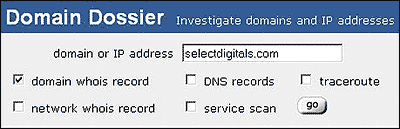
The best way to identify a plagiarist is to do a "whois" or similar "lookup" on the domain name. Using a "whois" lookup for the domain name will display contact information for the domain-name registrant. In my experience, plagiarists do not usually leave contact information on their pages, but the domain registrant is required to include it when the domain is registered--but plagiarists do not always include valid contact information! If you do not find valid contact information for the registrant, you can contact the registrar about this. Figure 5 shows the "lookup" form at domain white pages.
Figure 5: Whois Lookup at domainwhitepages.com
Depending on the lookup service used (internic, domaintools, domainwhitepages, etc.), the contact's email address might be an image and not text. In that case, you will have to type out the email address. Here is the registrant's information from a lookup of my web site:
Address lookup
canonical name: selectdigitals.com.
addresses 71.18.121.106
Domain Whois record
Queried whois.internic.net with "dom selectdigitals.com"...
Domain Name: SELECTDIGITALS.COM
Registrar: ENOM, INC.
Whois Server: whois.enom.com
Referral URL: http://www.enom.com
Name Server: NS5.IXWEBHOSTING.COM
Name Server: NS6.IXWEBHOSTING.COM
Status: ok
Updated Date: 19-feb-2009
Creation Date: 08-feb-2004
Expiration Date: 08-feb-2011
Last update of whois database: Fri, 23 Apr 2010 14:45:21 UTC
Registration Service Provided By: NameCheap.com
Contact: [email protected]
Registrant Contacts
Queried whois.enom.com with "selectdigitals.com"...
Registrant Contact:
Select Digitals
Royce Tivel
261 SE Craig RD #3
Shelton, WA 98584
US
Administrative Contact:
Select Digitals
Royce Tivel ([email protected])
+1.3604261221
261 SE Craig RD #3
Shelton, WA 98584
US
Technical Contact:
Select Digitals
Royce Tivel ([email protected])
+1.3604261221
261 SE Craig RD #3
Shelton, WA 98584
US
Status: Active
Name Servers:
ns5.ixwebhosting.com
ns6.ixwebhosting.com
Creation date: 08 Feb 2004 16:50:50
Expiration date: 08 Feb 2011 16:50:50
In the case of selectdigitals.com, all of the information necessary to contact the registrant is available. In my experience, registrants of MU sites have responded promptly to my complaint and have removed the offending "member"; so it is worthwhile to make the attempt and allow two or three days for a response. This gives the registrant a chance to comply with the original publisher's terms of service or to remove the content completely.
Sometimes, the registrar or registration service will provide a "firewall" for a registrant. At NameCheap.com, this is called "WhoisGuard." The registrar's contact information is given in the lookup and emails to the registrant are forwarded without giving away the registrant's "real" contact information.
Your goal in contacting the registrant is to get the article published accurately, completely (including resource box), and identified with the complete article source. You can help the honest publisher by supplying the article title, a link to the article source, and a copy of the resource box.
I have found that contacting a plagiarist by email is the least effective method of removing plagiarized content. Still, this attempt should be made to give the honest publisher a chance to make necessary changes. Also, the fact that you have made the attempt will give more weight to your complaints sent to the registrar, host, or to Google. Give the suspected plagiarist two or three days to respond.
Translating Your Documents into a Foreign Language
If you are trying to contact a registrant, registrar, or host in a foreign country (non-english speaking, in my case), you can take advantage of the Google translation service (see "References" section at the end of this article). I first create the letter in english and then use the translator to convert my letter into the foreign language. When you do this, it is very important to test any links you wish to include in the foreign version as, especially for complex links, some of the characters in the link might be converted to the foreign language and the link might not work: you might have to modify a translated link so it works.
My practice is to email the letter in english (my native language) together with a translated version. I typically use MS Word to compose my letters and then paste them into my email client. Note: I suggest "plugging" the translated copy back into the translator as a check: translating back to the original language might reveal problems with the translation that will have to be fixed. Also, some languages produce better translations than others.
4. Identify the Registrar or HOST
A lookup of the plagiarist's domain name will include a list of the domain-name servers(DNS). From the DNS information listed in the lookup above, the web host is clearly identified as "IXWEBHOSTING.COM":
Name Server: NS5.IXWEBHOSTING.COM
Name Server: NS6.IXWEBHOSTING.COM
A lookup on a DNS will yield additional information about the host used by the plagiarist—and the host's contact information. Here is some of the information available from a lookup of "ixwebhosting.com":
Host Contact Information
canonical name ixwebhosting.com.
addresses 98.130.254.120
Administrative Contact:
Said, Fathi [email protected]
1774 Dividend Dr
Columbus, OH 43228
US
6147079374
Similarly, a lookup for the registrar listed in the original "whois" will result in additional information about the registrar. A reputable registrar or host will provide information about reporting copyright infringements. As an example, the copyright policy for my domain's registrar can be viewed here:enom.com.
Registrars often use resellers for the business of domain registration. The resellers also have stringent policies against abuse. For my domain, the reseller is listed in the original lookup as follows:
Registration Service Provided By: NameCheap.com
Contacting the registrar or host is probably the most effective way to take a plagiarist's site or blog off the air. Here is what I do. I create a Digital Millennium Copyright Act (DMCA) complaint, just as I would for a complaint written for Google, except I do not use a title directed to Google. Both hosts and registrars take these complaints very seriously and, in my experience, take fast action to block the offending sites from web access.
Give the registrar or host two or three days to respond before going any further. I use this format for my complaints:
To: [registrant, registrar, or host name]
Date: [date and time]
Identify the copyrighted work,
Identify the offending web page, including the search query used to find it ("tower trainer 40"),
Provide your contact information,
Provide contact information (if any) for the plagiarist (the email address you used for the registrant),
Include specific language as to the accuracy of your complaint, and
Optional: If I have additional information, I put it here.
When you identify a plagiarist from another country, it might seem like an impossible task to get the content removed, but you might be surprised. Recently, I was able to get a web site blocked by a Korean registrar, co.cc. After identifying the registrar, I looked at their terms of service and here is what I found:
"You agree that you will not upload, distribute or reproduce on the Web Site:
a. any copyrighted material, trademarks, or other proprietary information without obtaining the prior written consent of the owner of such proprietary rights...."
After I submitted my complaint to the domain service registrar, co.cc, I got a response the next day:
"Dear Sir,
In reponse to your request, we have suspended ..., the domain won't work with co.cc domain for now.
However, I would like to inform you that we are just a domain service registrar.
For that reason, we do not have any authority over deleting original web site.
It seems keep happening no matter how many times we block up this kinds of sites, abuser do not stop abuse co.cc domain.
Please let me know if you face this kind of issues in the any future, I will try to take prompt action.
Thank you. "
The response reflects, I think, the frustration registrars and hosts feel in dealing with the huge problem of plagiarism. In this case, even though the site did not get deleted, it is no longer visible on the Web. If the site still remains in Google's search results, a Google DMCA should take care of the problem. Jonathan Bailey has this to say about contacting registrars:
"...even though it can work, I tell people to avoid sending
notices to registrars as almost none will actually revoke a domain
over a copyright issue. They will only do it if there is an issue with
the domain itself. Your interaction with co.cc was the exception, not
the rule (for better or worse)."
5. Submit a DMCA Complaint to Google
If nothing else seems to work, you can FAX a DMCA complaint directly to Google. Instructions for submitting a DMCA can be obtained from the resource link at the end of this article. Google has both legal support and AdSense support. Each support group has it's own FAX number for DMCA complaints (legal: (650) 963-3255; AdSense: (650) 618-8507). For action against a Google blogger, you can file a DMCA complaint online: check the resources at the end of this article for a link.
If AdSense is on the site along with the plagiarized content, a DMCA complaint to Google AdSense support just might hit the offender in the pocket book. Revenue from AdSense is often the primary reason plagiarists use your articles—your valued content draws increased traffic to the AdSense site.
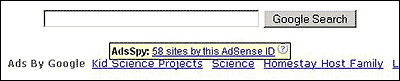
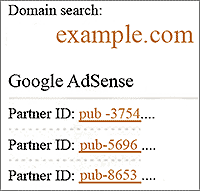
A useful add-on for FireFox users is SeoQuake. When this add-on is activated, hovering over an AdSense ad will bring up the "AdsSpy" with a link to information about the plagiarist's AdSense ID (Figure 6-7). The plagiarist's ID can be included with the DMCA complaint.
Figure 6: AdsSpy
Figure 7: AdSense ID
Plagiarism Check Tool
You can check your own work for unintended plagiarism with a tool available online. The tool, PlagiarismCheck, was developed in 2011. Here is what the site has to say about why you should use this tool:
"PlagiarismCheck.org is a proud community of developers, writers, and linguists working around one idea: to supply people with an inexpensive tool for protecting themselves and their work against accusations of plagiarism. Join our community of 77,000 members and get straight to writing better, more original content!
improve your writing
protect yourself from accusations of plagiarism
save yourself from worry: insure your writing with anti-plagiarism software"
Plagiarism, Plagerism, Plagirism, Plaigarism
You don't have to know how to spell "plagiarism" to join the fight against plagiarists. You can still detect plagiarism and join the war to remove it by
Putting your copyright information in the article body,
Begin plagiarism detection right away,
Identify the plagarism and the plagarist,
Try to contact the plagiarist and resolve the issues,
Contact the registrar or host about the plaigarism,
File a DMCA complaint against the plagiarist, and
Contribute your ideas and experiences with respect to detecting and fighting plagiarism by joining a forum on the topic or, better yet, write your own article.
After four years of college and after writing this article—I can still misspell plagiarism with the best of 'em. My favorite way to misspell it is, "plagerism."
http://www.copyscape.com/ -- A no-cost or low-cost web service to search for copies of your articles on the Web.
Jonathan Bailey
http://www.plagiarismtoday.com/ -- This is an outstanding site for more information about plagiarism. An easy way to access and browse all of the material on the site is to do a Google search query using the "site:" feature, like this: site:www.plagiarismtoday.com .
DMCA Takedown 101 -- This is a great article written by Jonathan which provides easy to understand information about the DMCA.
WhoIsHostingThis.com -- This is the easiest to use *no cost* service for finding host information that I have found on the Web. In some cases, though, you might still want to use another lookup service for more detailed information.
http://translate.google.com/# -- You don't have to give up just because a suspected plagiarist is in a foreign country and doesn't speak your language. You can use this tool to translate your complaints into the plagiarist's, registrar's, or host's native language. You can also translate the text on a web site to your own language and this can help you find contact information.