There are times when a WordPress user needs to know a category ID. For example, on this blog, I list the blog content in the sidebar by category. To do this, I need to know the ID for each category.
Each category ID is stored in the MySQL database as a term_id. In order to find these IDs, you can use the MySQL phpMyAdmin interface.
After selecting the WordPress database, browse the wp_terms table (Figure 1):
You will then see the term_id for each category (Figure 2):
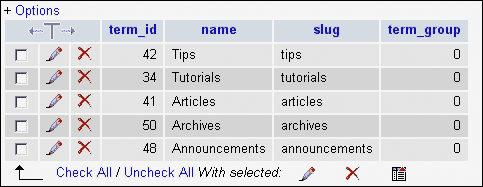
Make a list of these, or take a screen capture and print the image so that you will have a record of the category IDs. You can then use the IDs when required, as in the following PHP code which is used to create the article listing in the blog’s sidebar:
<li ><h2><br />Articles<br /><br /></h2>

<ul>

<?php

global $post;

$myposts = get_posts('numberposts=9&offset=0&category=41');

foreach($myposts as $post) :

setup_postdata($post);

?>

<li><a href="<?php echo get_permalink() ?>"><?php the_title(); ?></a></li>

<?php endforeach; ?>

</ul>

</li>